Registration / Program Editions
Golf League Secretary™ for Windows®
by GolfSoft® Company
Use GLS for a while before buying!
Golf League Secretary is only available
by download from this website.
Installation Disks or CD's are not
available to be shipped. After downloading, you can copy
the installation files to a folder on your hard drive or to a CD
ROM.
Click if
you are new to downloading. If you do not have internet access and are not
able to download GLS, please have a friend or relative download
the GLS files and make a copy for you...
Please read the
license
agreement to understand the GLS subscription and various editions, versions, etc. Also,
please do not attempt to order the program (obtain a subscription license) unless you feel the program will work for you.
Go ahead and try it for awhile. The unlicensed demo version is exactly
the same as the licensed version except for not allowing you to go past 5 weeks of data
entry for any league you create. That's the only difference! Except for the opening
and closing reminders that the program is unlicensed, the demo version and
licensed version are the same. There are no pressing reasons to order the
program immediately or until you have used it for a few weeks.
When you decide to subscribe...
It's EASY!
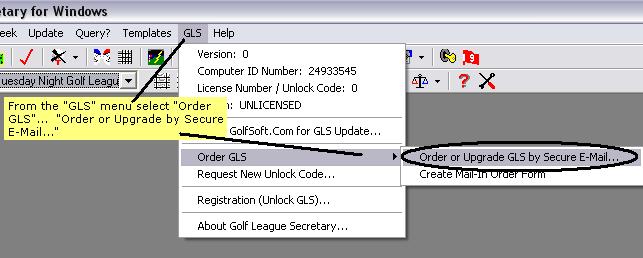
As shown in Figure 1, from the
"GLS" Menu, click "Order GLS." Then click "Order or Upgrade GLS by Secure
E-Mail." An order form will appear.
Figure 1 - Where to find GLS Order Form
Next, Fill out the order form...
After filling out the form
completely, Click the "Create Encrypted Email Order Text" button to create the
encrypted email order text. This text will appear in the large text box
below the button and will contain all the information needed to place an order for GLS.
The order text has been encrypted (scrambled) and can only be read by Golfsoft
Company. The decryption key is located on a "stand-alone" computer and
cannot be accessed by anyone over a network computer.
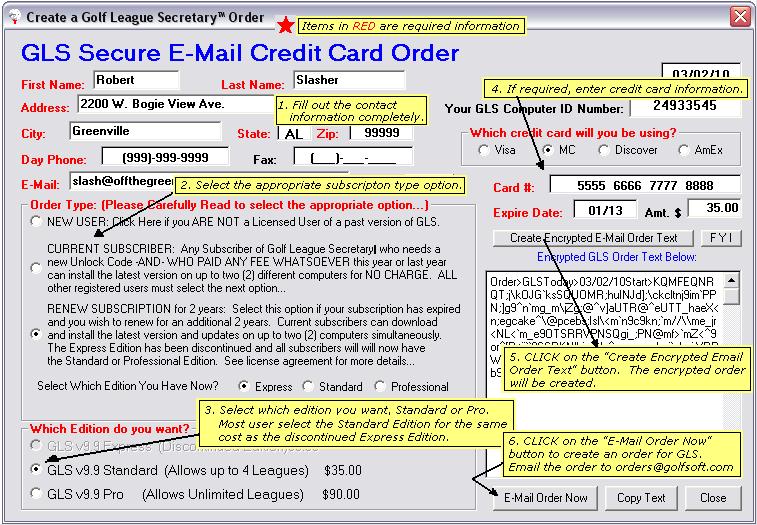
Figure 2 - The GLS Order Form
Create the Email Order and send it to Golfsoft... It's Secure!
When the encrypted order text has
been created, click the "E-mail Order Now" button (See Figure 3).
An email, from your default email program, will be composed. If, for some reason, the "E-Mail Order Now" button does not open your system
email program, you can copy the encrypted text and paste it into the body of an
email message. Use the words "GLS Order" as the email Subject.
Send this email, unedited, to Golfsoft.
Once the order is received, a license code, (UNLOCK CODE), and RECEIPT will be returned to you,
by email, within 48 hours. Your private information IS NOT stored on a network computer or server.
Thus, your data cannot be accessed by anyone over the internet. As per our
Privacy Statement, your information
WILL NOT, for any reason, be sold or shared with another party. Your
personal data will be used for this GLS order only.
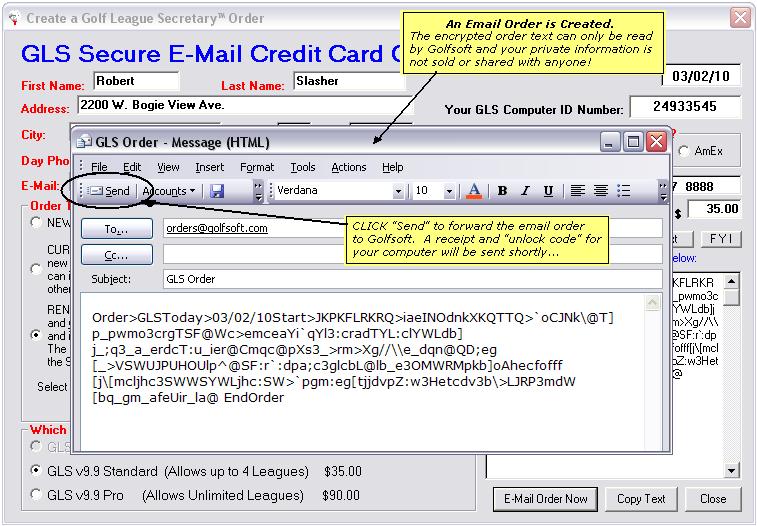
Figure 3 - Create and Send Encrypted Email GLS Order